A business phone should do more than simply make and receive calls. When properly configured, it can help employees communicate faster, transfer calls more accurately, see who is available, make announcements, and provide customers with a smoother, more professional experience.
At Supreme Call, we customize business VoIP phones around the way each company operates. Instead of giving every business the same basic setup, we configure the phone buttons, screen layout, call handling features, and company branding to match your team’s daily workflow.
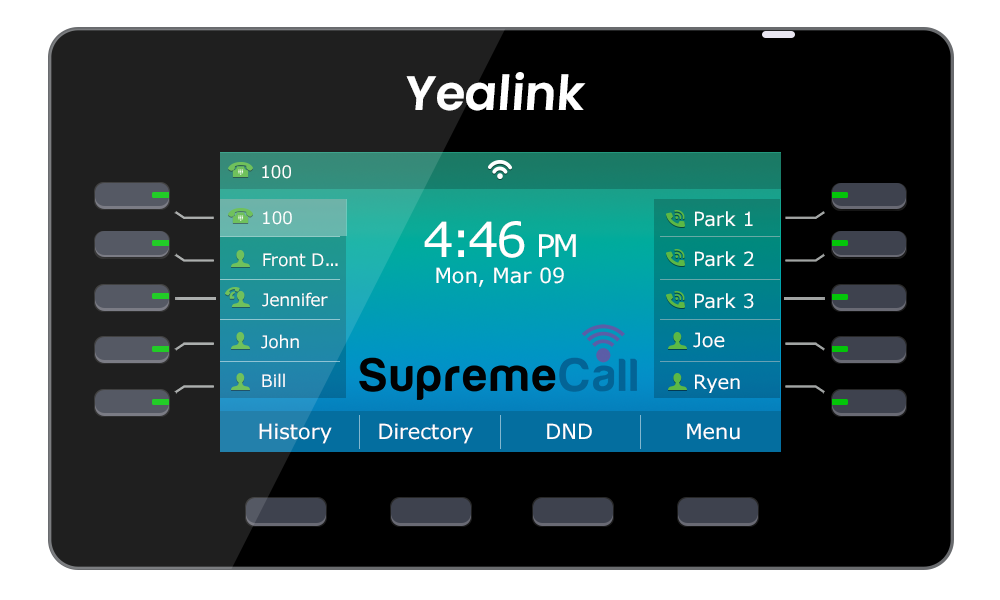
As shown in the example, employee names can appear directly on the phone’s display. Each name is assigned to a programmable button, commonly known as a Busy Lamp Field, or BLF, button.
Instead of remembering every employee’s extension, you can simply press the button next to their name.
The button also shows the employee’s current phone status. Depending on the configuration:
This makes transferring calls much easier. Before sending a customer to another employee, the receptionist or staff member can immediately see whether that person is available.
For businesses with multiple departments, the buttons can be organized by employee, office, team, or function. For example, you can create buttons for Sales, Billing, Customer Service, Management, or specific employees.
The phone display can also include buttons such as Park 1, Park 2, Park 3, and additional parking locations when needed.
Call parking is similar to placing a call on hold, but it provides more flexibility.
Imagine that a customer calls asking for a specific employee. Instead of transferring the call while the employee is unavailable, the receptionist can place the caller in Park 1. While parked, the caller can listen to your company’s hold music or a customized message.
The receptionist can then contact the employee and say:
“Your customer is waiting on Park 1.”
When the employee becomes available, they can press the Park 1 button from their own phone and immediately retrieve the call.
This feature is especially useful for:
Employees do not need to transfer the call several times or ask the customer to call back. The call remains safely parked until the appropriate person is ready to answer.
The center of the phone screen can be customized with your company’s logo.
This creates a more professional and consistent appearance throughout the office. Instead of showing a generic background, each phone can display your company name, logo, colors, or another approved image.
Customized branding is particularly valuable in reception areas, conference rooms, executive offices, and customer-facing locations. It may seem like a small detail, but it helps create a polished and professional workplace.
Paging is another powerful feature that can be added to a programmable phone button.
With paging, an employee can make an announcement through one phone, a selected group of phones, or the entire office.
For example:
“John, please call the front desk.”
“The delivery has arrived.”
“The meeting will begin in five minutes.”
You can create different paging groups based on the company’s needs. A business may have separate paging buttons for the warehouse, sales department, front office, management team, or the entire building.
Paging is especially useful for offices, warehouses, schools, medical facilities, retail stores, dealerships, and businesses where employees are not always sitting near the same phone.
Nearly every programmable button can be customized. Your phone can include one-touch access to frequently used features, numbers, and departments.
Common options include:
The objective is to reduce unnecessary steps. Instead of searching through menus, dialing long numbers, or trying to remember feature codes, employees can press one clearly labeled button.
Not every employee needs the same phone layout.
A receptionist may need buttons for every employee, multiple call park locations, paging groups, and department lines. A manager may only need buttons for key employees, voicemail, conferencing, and call recording. A warehouse employee may need paging, reception, and a few department buttons.
Supreme Call can configure each phone based on the employee’s position and responsibilities.
This creates a simpler experience for employees and avoids filling the screen with buttons they will never use.
A properly configured VoIP phone can save time, reduce missed calls, improve internal communication, and help employees provide better customer service.
Supreme Call does not simply deliver phones and leave your employees to figure them out. We customize the system, configure the buttons, create the call flow, add your company branding, and train your staff on how to use everything.
As a local Los Angeles VoIP provider, we help businesses build phone systems around the way they actually work.
Whether you need employee status buttons, call parking, paging, custom company branding, department shortcuts, or a completely customized phone layout, Supreme Call can create a system that makes communication faster and easier.